StoryShape 1.0 · User guide
Writing progress and goals
User guide Part 9 of 13
StoryShape keeps a quiet record of your writing, so you can see your days, sessions and streaks, set goals if they help, and turn them off if they don't. Deleting and revising never cost you progress.
Where to find it
- Progress, in the footer, or Workspace → Writing Progress…, shows your history: words per day and session, streaks, levels and achievements.
- Goals, in the footer, or Workspace → Writing Goals & Activity…, sets a daily goal, runs timed sessions and shows recent activity. The button says Activity when goals are turned off.
- Goals has three tabs: Today for the daily goal and timed sessions, Deadlines for word targets and due dates, and Activity for your history and corrections.
- To-do, beside Projects in the top bar, shows today’s words, your deadlines and your own to-dos. See Your to-do list.
Your writing history is saved inside the project, so it travels with it and nothing is sent anywhere.
How words are counted
StoryShape counts words the same way for draft totals, goals, observations and exports. Choose Help → How Words Are Counted… to see the rules with live examples.
- Words are found with standard Unicode word rules, the same on Mac, Windows, Linux and iPad.
- “don’t”, “1,000”, “3.14” and “example.com” each count as one word. Hyphenated words count each part, so “well-known” is two.
- Punctuation and whitespace on their own add nothing.
- Chinese, Japanese and Korean are split into words using language rules.
Your manuscript length counts each included scene once, in its chapter, its book and the project. World entries, ideas, comments, snapshots, cuttings and Trash add nothing. Other word processors may count slightly differently.
Words written
Words written, in Writing Progress, counts what you add. Each time a scene saves and has grown, the extra words are added to your total for the day. When a save makes a scene shorter, nothing is taken away. So a day of cutting doesn’t undo a day of writing.
The Goals dialog shows net words instead: words added minus words removed, so a day of heavy cutting can show a negative number there.
Imports, duplicated scenes and moves change your manuscript’s length without counting as writing.
Sessions
A session is a stretch of writing. There are two kinds:
- A writing burst is found for you: a run of saves with no gap longer than 30 minutes.
- A timed session is one you start yourself in Goals. See Timed sessions.
Writing Progress shows how many sessions you’ve had, your best and average session, and a chart of recent sessions.
Streaks
Your writing streak is the number of days in a row you’ve written something. It stays alive as long as you wrote today or yesterday, so you have until the end of today to keep it going. Writing Progress also shows your Longest streak.
Levels
Levels follow your total words written. There are twelve:
| Level | Name | Words written |
|---|---|---|
| 1 | Dreamer | 0 |
| 2 | Scribbler | 1,000 |
| 3 | Wordsmith | 5,000 |
| 4 | Storyteller | 15,000 |
| 5 | Chronicler | 30,000 |
| 6 | Novelist | 50,000 |
| 7 | Bard | 80,000 |
| 8 | Loremaster | 120,000 |
| 9 | Author | 200,000 |
| 10 | Laureate | 350,000 |
| 11 | Legend | 500,000 |
| 12 | Mythmaker | 1,000,000 |
Achievements
| Achievement | How to earn it |
|---|---|
| First Words | Write on your first day |
| Thousand Club | Write 1,000 words in a day |
| Marathon | Write 5,000 words in a day |
| Momentum | Write three days in a row |
| Week Warrior | Write seven days in a row |
| Habit Formed | Write thirty days in a row |
| Centurion | Write a hundred days in a row |
| Novella | Write 20,000 words |
| Novel | Write 50,000 words, a NaNoWriMo novel |
| Epic | Write 100,000 words |
| Goal Getter | Reach your daily goal on seven days (appears once you set a daily goal) |
| Early Bird | Start a session before 7 a.m. |
| Night Owl | Write between midnight and 4 a.m. |
| Deep Work | Write for an hour in one session |
| Sprinter | Write 500 words in 20 minutes or less |
| Comeback | Return to writing after two weeks away |
Earned achievements show the date. The others show how close you are.
Deadline badges
Under Deadlines, Progress has four more badges, and a Deadlines met count beside your other stats. A deadline counts as met when you mark the item Complete on or before its due date.
| Badge | How to earn it |
|---|---|
| On Time | Mark a chapter or scene Complete by its due date |
| Pass Complete | Complete a revision pass by its due date |
| Three for Three | Meet three deadlines in a row |
| The End, On Time | Mark a book Complete by its due date |
Missing a deadline never takes a badge away; it only breaks a run. Move the date in Deadlines and carry on.
Writing Progress
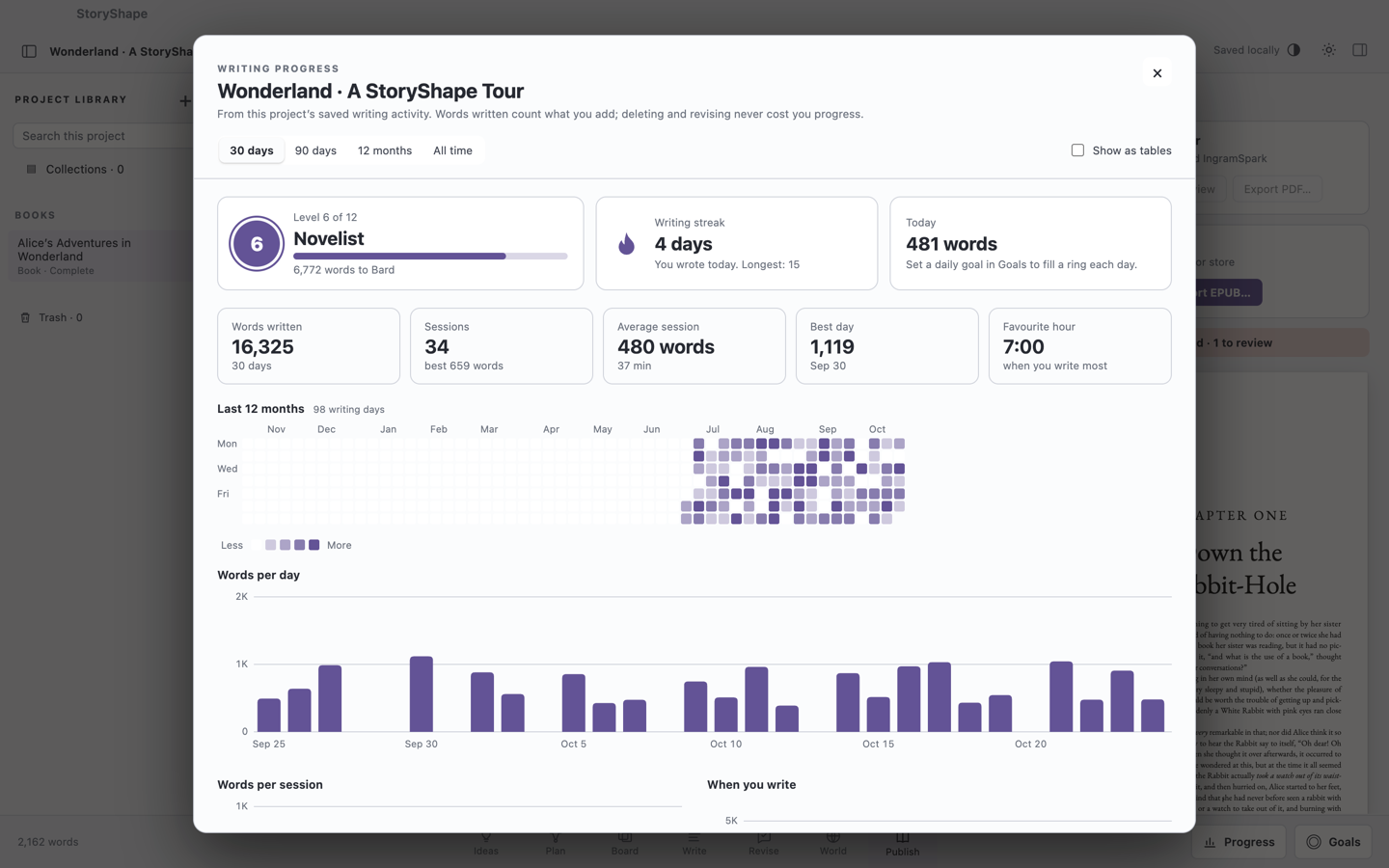
Choose a range: 30 days, 90 days, 12 months or All time. With more than one book, choose a Book or All books.
- Level, Writing streak and Today sit at the top.
- Tiles show Words written, Sessions (with your best), Average session (words and time), Best day and Favourite hour.
- The heatmap shows the last 12 months; darker days are bigger days, and days you met your daily goal are outlined.
- Words per day (or per week, for longer ranges), Words per session and When you write are charts.
- Achievements lists what you’ve earned and what’s next.
Tick Show as tables to see the numbers as tables instead of charts.
Daily goal
- Choose Goals in the footer. It opens on the Today tab.
- Type a Daily target · words.
- Choose your Activity time zone, so “today” means your today.
- Choose Save daily goal.
The Today card in Writing Progress fills as you write, and says Daily goal reached when you’re there.
Timed sessions
A timed session is a sprint with a clock.
- In Goals, under Writing session, choose a Session scope: the Whole project or one book.
- Optionally set a Session target · words.
- Choose Start session. The footer button shows the time as you write.
- Choose Pause for a break and Resume to carry on. Paused time and writing don’t count toward the session, but your daily activity still counts.
- Choose Finish session when you’re done.
Only one session runs at a time. Closing StoryShape or switching projects pauses it; if a session shows Interrupted, choose Resume to continue.
Deadlines
The Deadlines tab in Goals holds every word target and due date: the whole project, each book, chapter and scene, and your revision passes. StoryShape works out the words a day you need. See Word targets, budgets and deadlines.
Your to-do list
Choose To-do, beside Projects in the top bar.
- Today is always at the top: the words you’ve written today against what your deadlines need today, or your daily goal if nothing is due. It turns green once you’ve written enough, and stays at the top. Your writing streak shows here too.
- Below it are your deadlines and revision pass due dates, and your own to-dos, soonest first. Overdue items are red and this week’s are amber. Choose a deadline to open it in Goals → Deadlines.
- Add a to-do with a title, an optional due date and an importance (high, normal or low). Tick it when it’s done; finished items fold into Done, and Clear finished to-dos removes them. Choose a to-do to change or delete it.
- The number on the button counts what’s due today or overdue.
To-dos are saved in the project, so they travel with it. Undo works on them like any other change.
Correct your activity
If your history is wrong, for example after pasting in a chapter you wrote elsewhere, open Correct local activity in Goals. Enter a Net adjustment · words (+ or −), the Activity day, an optional book, and Why this correction?, then choose Add correction. Corrections adjust your history only; they never change your manuscript. They’re listed under Correction history.
Turn goals off
Not everyone wants targets. To hide them:
- Choose Workspace → Writing Preferences & Spelling….
- Untick Show word goals and target prompts.
- Choose Save preferences.
This hides word targets, budgets, deadlines, levels, streaks and achievements for this project. Word counts, writing activity and timers stay available, and your targets are kept, so you can turn them back on whenever you like.